Summary: From Stars to Productivity—2026 is the Year of AI Agents
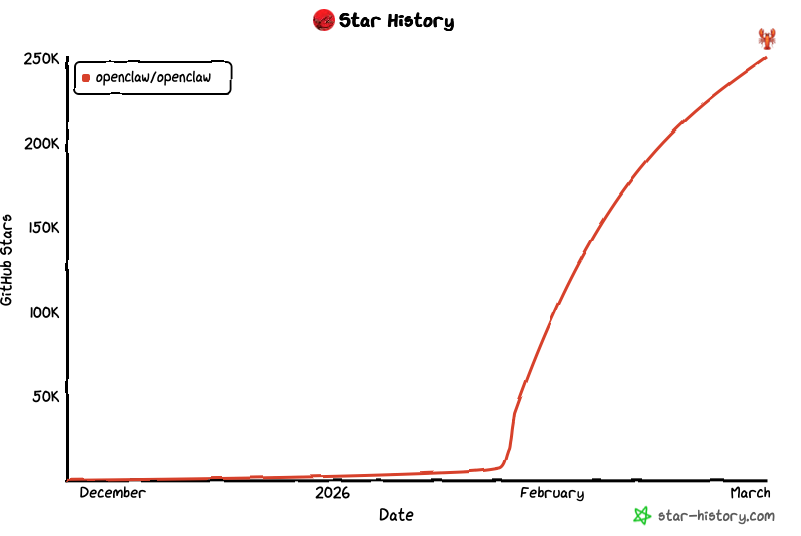
In Q1 2026, the GitHub Trending charts have been dominated by an open-source project named OpenClaw. Surpassing 50,000 stars in just three months, it has become the most anticipated AI Agent framework since AutoGPT. Unlike previous concepts, OpenClaw executes complex file management, code compilation, and cross-app workflows directly on macOS.
However, as the hype grows, developers are facing a harsh reality: local MacBook sleep settings and network constraints turn this "digital brain" into an intermittent helper. This guide explores why the smartest developers in 2026 are deploying OpenClaw on sftpmac remote bare-metal nodes to achieve true AI autonomy.
📜 Navigation (TOC)
1. Unmasking OpenClaw: Why it's the Must-Star Project of 2026
The meteoric rise of OpenClaw isn't accidental; it solves the "last mile" problem of AI implementation:
- Minimalist GUI Companion: Unlike agents requiring tedious CLI configs, OpenClaw provides a native macOS GUI, allowing technical and non-technical users alike to issue tasks visually.
- Claude 4.6 Precision: With deeply optimized prompt engineering, OpenClaw enables Claude 4.6 to accurately identify AppleScript commands, controlling pro software like Xcode and Final Cut Pro.
- Private Data Sovereignty: All analysis occurs locally (or on a private remote Mac), eliminating the need to upload sensitive enterprise data to third-party SaaS platforms.
2. Deployment Hurdles: 4 Weaknesses of Local PCs for AI Agents
While OpenClaw runs on standard laptops, the local environment shows fatal flaws for production-grade productivity:
| Metric | Local MacBook Execution | sftpmac Remote Hosting |
|---|---|---|
| Persistence | Interrupted by sleep mode; no 24/7 uptime | 24/7 Always-on; supports long cycles |
| Hardware Strain | Heavily drains CPU/GPU; thermal throttling | Dedicated physical NPU; zero local lag |
| Bandwidth | Limited by home WiFi; slow model sync | 1Gbps+ Dedicated pipe; instant loading |
| Isolation | AI errors could corrupt system files | Physical sandbox; instant image reset |
3. sftpmac Edge: Unleashing OpenClaw on Remote Mac
sftpmac doesn't just provide a Mac; it offers a customized environment for OpenClaw:
- M4 Chip NPU Acceleration: All nodes feature M4 series chips, where the Neural Engine speeds up visual screen analysis by 3x.
- Pre-installed Toolchains: One-click deployment for Homebrew, Node.js, and OpenClaw dependencies, saving hours of configuration.
- WebSocket Global Tunnel: Use our secure tunnel to monitor your AI agent's status from your phone anywhere in the world.
4. Quick Start: 3 Steps to Launch Your Remote AI Assistant
01 SSH into the Bare-Metal Environment
Get credentials from the sftpmac dashboard. Use the internal IP for extreme 10Gbps transmission speeds.
ssh user@sftpmac-remote-node -p 2222
02 Clone and Build OpenClaw Core
Pull latest code directly from GitHub. On sftpmac's high-speed backbone, cloning takes under 5 seconds.
# Cloning and installing
git clone https://github.com/openclaw/openclaw.git
cd openclaw && npm install && npm run build
03 Configure 24/7 Daemon
Use `pm2` to ensure your AI never goes offline, even when you shut down your local laptop.
pm2 start "npm run start" --name openclaw-agent
5. Outlook: From GitHub Trend to Enterprise Automation Hub
2026 is the watershed year for AI Agent adoption. The explosion of OpenClaw proves the developer's thirst for autonomous execution. By combining this trending project with stable sftpmac remote Mac hosting, you aren't just running software—you're building an infinitely scalable enterprise automation hub.