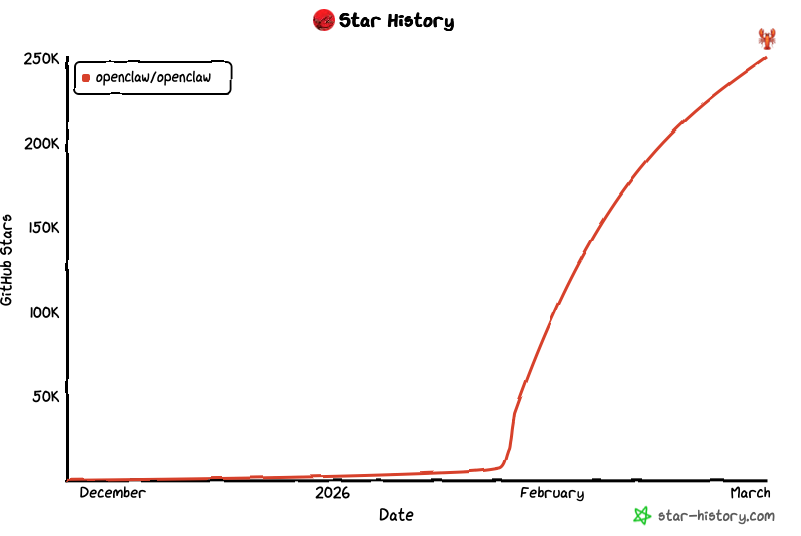
Why OpenClaw Adoption Spiked in 2026 and What Teams Need to Stabilize First
OpenClaw moved from an enthusiast tool to a team-level automation layer in 2026 because it can now drive practical workflows: repository analysis, file operations, packaging steps, shared task triggers, and routine engineering handoffs. That shift changes the rollout question. A single user can tolerate an improvised setup. A team cannot. Once multiple engineers, designers, or operators share the same remote Mac environment, inconsistent paths and mixed permissions quickly become the main source of instability.
In other words, the first job is not showing off the most advanced skill pack. It is making the operating surface predictable. Teams need one project layout, one sync method, one place for models, one set of write boundaries, and one onboarding path for new users. Remote Mac is valuable here because it gives you a stable always-on Apple environment. But that value appears only when rollout discipline comes first.
- Risk 1: every user syncs projects differently and paths drift immediately.
- Risk 2: models, caches, and shared resources end up in the same tree.
- Risk 3: new teammates follow personal habits and operational drift accelerates.
How to Design Project Sync Rules Before the First Team Rollout
The fastest way to make a rollout unstable is to let the same repository arrive on the remote Mac through five different methods. Some people will clone directly, some will drag archives, some will overwrite folders with rsync, and some will mix project code with generated output. OpenClaw then inherits that mess and your automation logic becomes harder to trust.
A better pattern is to define a fixed workspace before the first shared rollout begins. For example, keep active repositories in `/workspace/projects`, large models in `/workspace/models`, team resources in `/workspace/resources`, cacheable material in `/workspace/cache`, and exports in `/workspace/output`. Then define which transport belongs to each layer: Git or controlled rsync for source trees, SFTP or rsync for large model distribution, and a separate output path for generated artifacts.
Once that structure is stable, OpenClaw tasks, scripts, and operators can rely on consistent paths instead of guessing where each teammate put the same files.
Moving Models and Shared Resources Without Slowing Down the Remote Mac
As OpenClaw adoption grows, the heaviest operational burden is often not source code but models, packaged resources, and shared dependency bundles. Allowing every user to upload and replace these manually creates three predictable problems: duplicated transfers, version mismatch, and no clear ownership of updates.
| Asset Type | Recommended Path | Preferred Method | Control Goal |
|---|---|---|---|
| Project source | /workspace/projects | Git or rsync | Repository discipline |
| Models | /workspace/models | SFTP or rsync | Version and checksum control |
| Shared resources | /workspace/resources | SFTP | Clear read/write ownership |
| Cache | /workspace/cache | Generated locally | Safe cleanup boundaries |
| Exports | /workspace/output | SFTP | Archive by task or user |
Teams should treat model transfer as an auditable process, not a convenience action. That means using fixed version labels, keeping replacement authority narrow, and separating shared resources from active workspaces. This lowers first-time rollout friction and keeps remote Mac bandwidth focused on useful work rather than repeated manual uploads.
Setting Directory Permissions So Teammates Can Work Without Breaking Each Other
Because OpenClaw can act on files, remote Mac rollout must define directory boundaries early. Without that, one task template or one user mistake can affect a shared workspace far beyond its intended scope.
/workspace/
  projects/      # active repositories
  models/        # shared model storage
  resources/     # team-owned shared material
  cache/         # disposable local cache
  output/        # generated exports and delivery files

# Recommended rules
- OpenClaw runtime account should not own broad system privileges
- models should default to controlled updates, not free-for-all writes
- output should be writable, but split by user or job
- cache must stay isolated from long-term delivery assets
These directory boundaries make it easier to reason about incidents. If generated files appear in the wrong location, or if a shared resource suddenly disappears, the responsible zone becomes visible immediately. That is exactly the kind of operational clarity teams need after an internal adoption spike.
The Most Common Onboarding Pitfalls When OpenClaw Expands Beyond Early Adopters
Many OpenClaw rollouts do not fail because the tool is weak. They fail because early adopters know a dozen unwritten rules and new teammates do not. One person places models under the repo root. Another points output into a shared directory. Someone else keeps giant caches next to production resources. Support overhead rises and nobody fully trusts the environment anymore.
- Pitfall 1: inconsistent project roots break shared task templates.
- Pitfall 2: mixed cache locations fill disks and confuse cleanup.
- Pitfall 3: unmanaged model uploads create version drift.
- Pitfall 4: shortcut permissions solve one problem and create three future ones.
This is why a concise onboarding checklist matters so much. It should explain where code lives, where models live, where outputs go, which paths are read-only, who owns updates, and how rollback works when something goes wrong.
A Practical Rollout Checklist for Stable Team Delivery on Remote Mac
Teams should resist the urge to switch everyone at once just because OpenClaw is trending. A safer path is staged rollout: choose one repository, one or two operators, one shared model set, and one controlled workspace pattern. Once project sync, permissions, and output routing are proven stable, extend the pattern to more users and more workflows.
A useful checklist includes: agreed project paths, fixed sync rules, known model versions, clear write boundaries, cleanup rules for cache, archive rules for output, and task templates that reference only standard directories. Those controls are not bureaucracy. They are what turn OpenClaw from a demo into a durable team workflow.
What should teams standardize before rolling out OpenClaw on remote Mac?
Start with a shared project layout, sync method, model storage location, permission policy, and onboarding checklist. Most rollout issues come from teams skipping these basics and letting each user improvise.
Should models and project files live in the same directory tree?
Usually no. Keeping models, cached resources, and active project workspaces separated makes updates safer, reduces accidental deletions, and helps teams control access more clearly.
What causes unstable delivery after OpenClaw becomes popular inside a team?
The usual causes are inconsistent sync rules, oversized first-time transfers, mixed permissions, and unclear ownership of shared folders. Stable delivery comes from standardizing these operational details early.
Stabilize paths, permissions, and model distribution before expanding automation scope. That order is what keeps remote Mac delivery predictable as OpenClaw adoption grows.